How to make AI ads ads for mobile apps
 By Acesley Chan · Updated · 18 min read · How we fact-check
To make an AI ads ad for an app, choose one customer problem, show the real app interface, write a short hook and demonstration, then review the generated presenter and claims. Below is our 11.3-second fictional Drift sample, including the production process and its limitations.
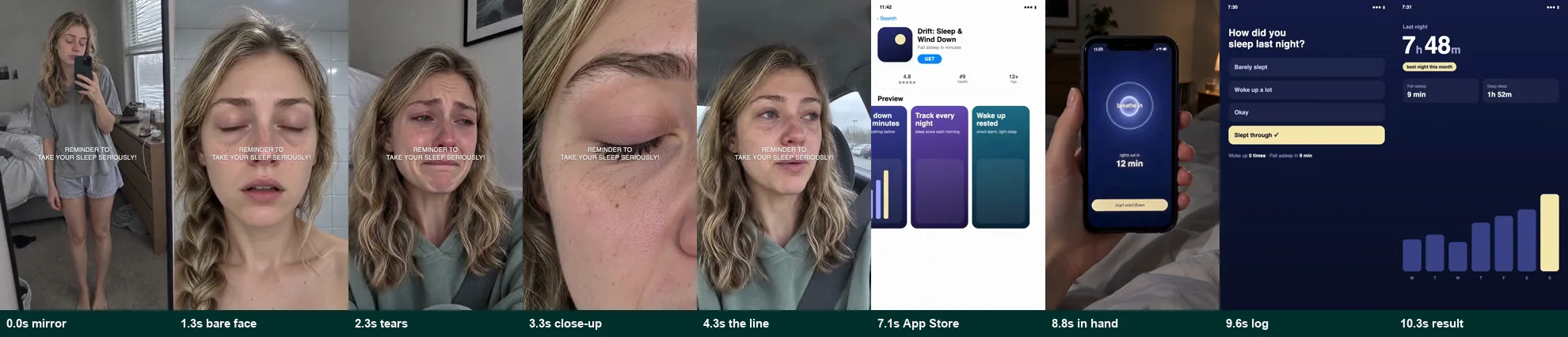
The finished ad. 11.3 seconds, 9 shots. The public review copy has no audio track; the original production included one spoken line.
Everything you see is AI generated except the app screens, which are a real interface we built. The woman does not exist and neither does the app. This is a sample, not a testimonial.
AI GENERATED · FICTIONAL APP · SILENT REVIEW COPYCorrection, 1 October 2026: Ad longevity and advertiser revenue estimates do not verify campaign profitability. This walkthrough documents production of a fictional app sample; it is not a performance case study. See service updates.
An AI ads ad for a mobile app uses a generated presenter to demonstrate an offer. Study references to form a creative hypothesis, then write an original script and use your own product interface. A reference is not permission to copy its footage, identity or music. Check the relevant platform disclosure requirements before publishing; this guide is not legal advice.
This walkthrough uses a fictional sleep app called Drift to document generation and editing. The earlier version described 185 collected ads and a 207-day reference. The collection manifest is not published and was not located during this evidence review, so the count is not a verified research result. The reference screenshot is historical context, not evidence of conversions or profit.
- Use public references to form hypotheses, not to identify a proven winner. No advertiser spend, conversion or profit records are available for the reference.
- The reference structure is about 7 seconds of problem-focused scenes, then 4 seconds of product demonstration ending on an outcome claim. The reference claim is not independently substantiated here.
- Generate one face and build every shot from it. Turn stills into short motion clips; stills read as a slideshow.
- Never let AI draw your app's interface. Record the real app.
- Review platform disclosure controls and clearly identify synthetic presenters. An AI label does not make a fictional customer experience or unsupported result acceptable.
A UGC ad script template for your app
Use this fill-in outline to brief an AI presenter ad. It is a writing aid, not a tested performance formula. Replace every bracket with a verified detail from your app and keep one main message.
- Problem: “Need to [specific task] without [specific obstacle]?” Show the situation without claiming to be a real customer.
- App: “[App name] lets you [verified action].” Introduce the actual app name and a real interface view.
- Demonstration: “Open [screen], choose [control] and [observable result].” Use a screen recording that matches the current product.
- Next step: “[Accurate call to action].” Mention a free trial or free download only if the current offer supports it.
Three opening options for the same base video: lead with the task (“Need to [task]?”), the feature (“[Feature] in [app name]”), or the demonstration (“Here is how to [task] in [app name]”). Keep the rest of the video fixed if the opening is what you want to compare.
Before approval, check that the spoken script matches the screen recording, the offer is current, and every claim has support. Avoid invented “I tried this” testimonials. Confirm the required AI disclosure before publishing.
Download the plain-text script and brief template to fill in with your own product details.
1. Find an app ad worth studying
Search the Meta Ad Library for offers and customer problems relevant to your app. Record the advertiser, library ID, search filters, capture date and visible start date. Keep a dated screenshot or export so another reader can check what you observed.
Our historical reference was library ID 1473159931036129. The retained screenshot shows a start date of March 3, 2026 and four ads using the creative. A September 26 capture would place those dates 207 calendar days apart. This does not establish uninterrupted delivery, meaningful spend or profitability; the screenshot and dates do not independently verify campaign results.
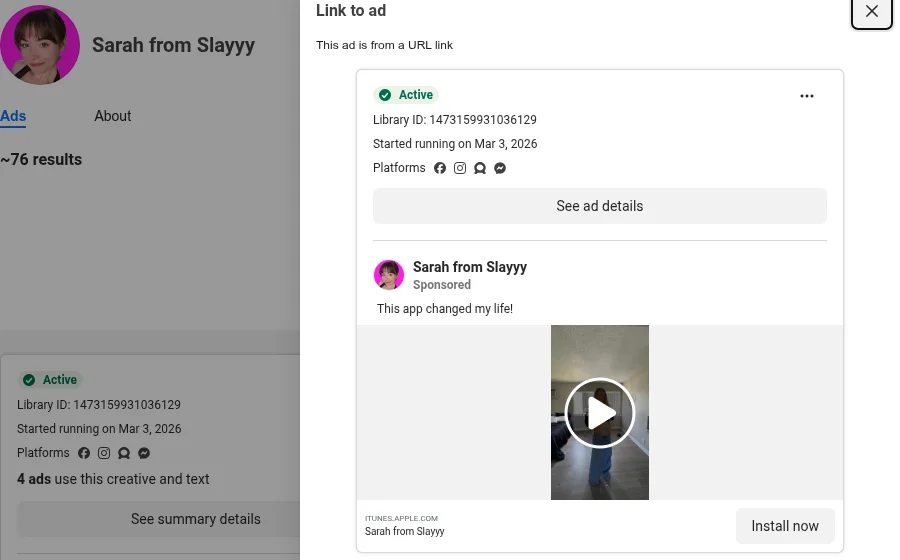
The previous advertiser-ranking table and revenue figures have been removed because a reproducible collection manifest and supporting estimate receipt are unavailable in this review. Multiple copies of a creative can serve different placements, audiences or administrative purposes; they do not prove that it won a test.
2. Break it down second by second
A breakdown describes creative choices; it does not explain measured performance. For this sample, the production process transcribed audio, sampled frames and identified cuts to produce the following timing notes. The comparison is a production exercise, not a recommendation to duplicate protected expression.
The result is a shot list you can build against. Here is the reference, in the order it plays:
| Time | Shot | What it does |
|---|---|---|
| 0.0 to 1.3s | Mirror selfie, full body | Shows the problem on the body. No words. |
| 1.3 to 2.3s | Bare face, no makeup | Raw and unflattering on purpose. |
| 2.3 to 3.3s | Close to tears | The emotional low point. |
| 3.3 to 4.3s | Extreme skin close up | A close-up intended to attract attention; no attention metric was available. |
| 4.3 to 7.3s | Car selfie, talking | The only spoken line: "I literally don't even recognize myself." |
| 7.3 to 8.8s | App Store listing | The first time the app appears. |
| 8.8 to 9.6s | Phone in hand, in a store | The app used in real life. |
| 9.6 to 10.3s | Logging screen | How it works, in one tap. |
| 10.3 to 11.3s | Result: 3.1 lb lost | Ends on a specific number. |
One caption sits in the middle of the frame for the first seven seconds and never changes: "Reminder to take PCOS seriously!" A hummed track plays under everything.
The reference shows problem-focused scenes before introducing the product, followed by an outcome claim. Our interpretation is that this sequence attempts to create recognition before a demonstration; no viewer-response data was available to test that interpretation.
The reference devotes about seven seconds to a problem and four seconds to a product. That is one possible narrative hypothesis, not proven evidence that the pacing will work for another app.
3. Keep the structure, replace everything else
Use the reference to identify a narrative hypothesis, then develop an original execution.
Identify broad narrative functions such as problem, demonstration and call to action. Write your own script, timing and visual treatment. Avoid duplicating the distinctive shot sequence or using another advertiser’s footage, likeness, music or script without permission.
For Drift, each shot kept its job:
| Time | Reference | Drift version |
|---|---|---|
| 0.0s | Mirror selfie, showing her body | Mirror selfie, slumped, three empty coffee cups on the dresser |
| 1.3s | Bare face | Bare face, puffy eyes, bathroom light |
| 2.3s | Close to tears | Close to tears from exhaustion |
| 3.3s | Skin close up | Eye close up, dark circle, slow blink |
| 4.3s | "I literally don't even recognize myself." | "I genuinely don't remember what sleep feels like." |
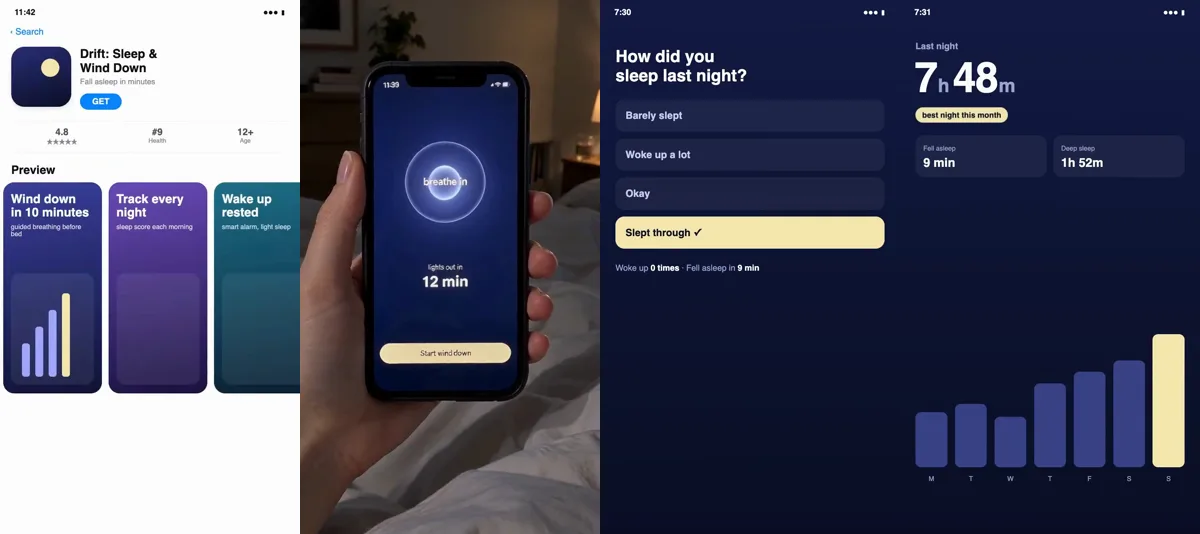
| 7.1s | App Store listing | App Store listing for Drift |
| 8.8s | Scanning food in a store | Wind down screen, in bed at night |
| 9.6s | Log a symptom | "How did you sleep last night?" |
| 10.3s | 3.1 lb lost | 7h 48m slept, best night this month |
Both lines are short; check the generated delivery against the approved timing rather than assuming word count guarantees a fit. The caption became "Reminder to take your sleep seriously!", same length and same position.
For a real app, investigate the problems customers describe in reviews and support messages. Summarize those needs in original language; obtain permission before quoting a customer or implying an endorsement. This reference does not establish what all people with PCOS say.
4. Generate one face, then every shot from it
A presenter whose appearance changes between shots can make continuity less convincing. So generate the person once, approve that image, and use it as the reference for every other shot.
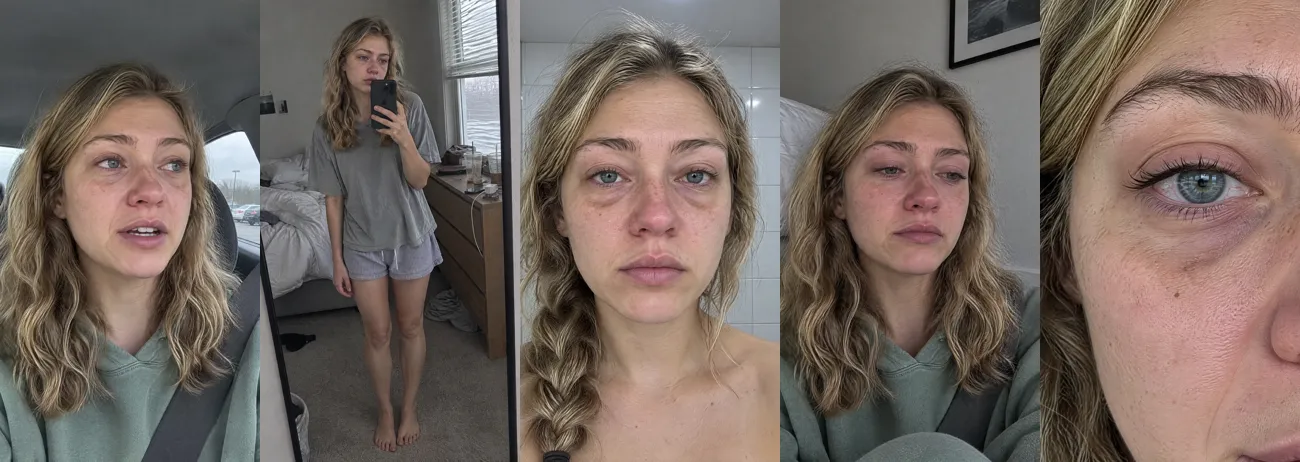
I used an image model for the stills and a video model for anything that moves. The prompts describe how a phone photo actually looks, not how a photographer would light it:
A photograph captured as a single frame from a video actually shot on an iPhone,
with the texture of real iPhone footage. The background is clearly visible, with
no depth of field blur. Skin texture is natural and fine, and the lighting is natural.

The same woman as in [reference]: same face, hair and freckles. A straight on
front camera selfie close up in the morning, completely bare skin, puffy under
eyes, blank flat expression. Harsh cool bathroom light from above.
Retained generation prompts are available. The file is not independently verified as a complete record of every generation or final-frame asset.
Three things went wrong, and all three are worth knowing before you start:
- A frame from the real ad was rejected as a reference. I first tried to use a frame of the original creator to match the camera angle. The generator refused it. Describing the angle in words worked, and it is the right practice anyway: never feed a real person's face into your ad.
- Still images looked dead. My first cut used still photos with a slight handheld wobble. It read as a slideshow. I turned each still into a four second video clip where she blinks, breathes and tears up, then cut the most alive second from each one. That single change did more for realism than anything else.
- The historical editing log reports a quiet talking clip and an unwanted opening breath. The breath was trimmed and the voice compressed. The original measurement logs have not been recovered; these are author-reported observations, not independently reproduced measurements.
Include the approved line in the generation prompt to reduce unintended wording. A prompt does not guarantee accurate speech. Then transcribe the result to confirm what she actually said. My first transcription heard "wheel's like" instead of "feels like". A second model confirmed the audio was correct.
5. Build the app screens as real UI, not AI
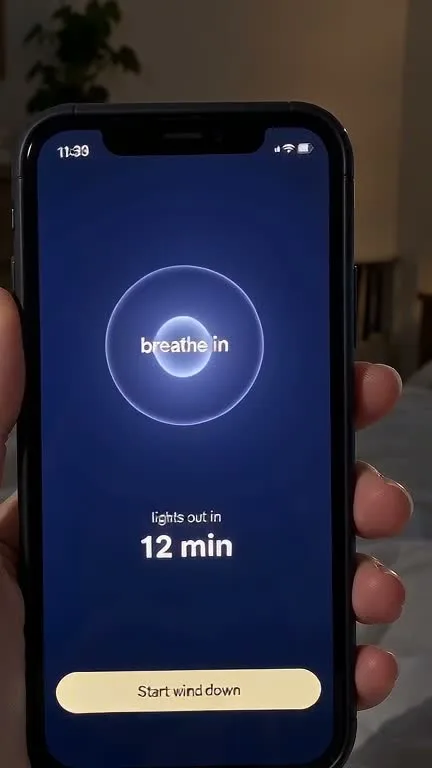
Image and video models are bad at interface text. Buttons come out misspelled and numbers change between frames. For the part of the ad that sells the product, that is not acceptable.
So the Drift screens are a real interface: an HTML page with an App Store listing, a sleep log and a results screen, recorded in a browser at the ad's exact timing. The result number counts up to 7h 48m and a badge appears, all on real text.
For the phone in hand shot, I gave the image model a screenshot of the real wind down screen as a reference. The screen text came out correct, which I checked at full size before using it:
6. Design sound you have permission to use
Use sound to support the intended mood and keep speech clear. A music-identification result identifies a recording; it grants no usage rights. This public sample is presented without an audio track because a commercial license for the previously matched reference recording has not been verified.
For a real campaign, use original audio with documented rights or a library license that covers the advertiser, paid media, placements, territory and duration. Keep the license and asset ID with the project. Do not assume that adding a trending sound inside an app makes paid advertising lawful.
TikTok’s Commercial Music Library guidance distinguishes its business-cleared library from other sounds. Check the track’s applicable terms; permission for TikTok does not automatically cover a Meta ad or a website embed.
7. Check it frame by frame before you ship
Every version I exported looked fine at normal speed. Checking it frame by frame found two problems that viewers would have felt without knowing why:
- A brief black gap between the talking shot and the App Store shot, reported in the historical editing log. The original frame-count measurement is unavailable.
- An unwanted log-screen flash before the phone-in-hand shot, reported in the historical editing log. The precise historical frame count has not been reproduced.
Here is the checklist I now run on every ad before it goes out:
- No black or empty frames anywhere. Measure it, do not eyeball it.
- The same person in every shot.
- Every word on screen spelled correctly, at full size.
- The spoken line transcribed and matched word for word against the script.
- Total length and shot boundaries match the approved original treatment.
- Voice and music are intelligible, balanced and within the delivery specification; rights are documented.
- Watched once with sound and once without.
8. Export it to each platform's specs
A good ad can still fail at upload. Check the file against each platform's own specs before you spend a cent.
| Spec | TikTok in-feed (non-Spark) | Our Drift file |
|---|---|---|
| Aspect ratio | 9:16 vertical recommended, at least 540×960px | 9:16, 540×960px (public silent copy) |
| Length | Up to 10 minutes | 11.3 seconds |
| File size | 500 MB or less | 565,648 bytes (public silent copy) |
| Bitrate | 516 kbps or more | about 399 kbps overall (silent website copy, not the upload master) |
This silent website copy is below TikTok’s published non-Spark bitrate minimum and must not be used as the campaign upload master. Export and inspect a separate delivery file against the current placement specifications.
Review placement previews and keep essential captions, product details and logos within the usable area. Meta’s official Reels ads overview explains placement and creative guidance. Confirm the current safe-zone overlay in Ads Manager; do not assume that one caption position suits every placement.
The Drift caption uses a central position in this sample. Review the final placement preview because interface controls can cover different areas.
Test it before you scale it
Define the primary business outcome, attribution window, minimum useful improvement and decision rule before testing. Use comparable randomized groups where supported, account for conversion delay, and classify low-information results as inconclusive. Three-second views are diagnostic; they do not establish profitable customer acquisition. Confirm promising variants on fresh traffic. The testing protocol below explains the evidence to retain.
9. Review disclosures, claims and rights before launch
This is production guidance, not a legal opinion or platform approval. Requirements depend on the content, market, placement and current platform rules. A qualified adviser should review regulated or health-related claims.
Do not manufacture customer experience
The FTC’s consumer reviews and testimonials FAQ explains that its rule does not ban AI stock avatars as a category. Fake or false testimonials and deceptive presentations remain a problem. A generated character must not imply that an actual customer achieved a result they did not achieve. An AI disclosure does not cure a misleading claim.
The sleep duration shown here is a fictional interface value, not a health benefit, real user outcome or client performance result. For a real campaign, retain the evidence for every product claim and get permission for any genuine customer material.
Use the platform’s applicable AI disclosure controls
TikTok’s Ads Manager disclaimer guidance lists AI-generated, synthetic or significantly AI-modified media among mandatory disclaimer cases. Check the current upload controls for your campaign. Meta’s June 1, 2026 transparency update describes a rollout of AI information within About this ad and detection of third-party AI signals. Availability and display can vary during rollout. Follow the current controls for your placement; the update is not a guarantee that every generated ad will show the same label. Do not assume a filename or metadata alone creates an adequate viewer disclosure.
Test the hypothesis with your own campaign data
This sample has no campaign dataset to backtest and no forward-test result. To evaluate a real creative, define a primary metric such as cost per qualified purchase, with a documented attribution window and conversion definition. Set a target based on margin, refunds and repeat purchase assumptions; state those assumptions rather than calling any ad a guaranteed winner.
- Prepare comparable variants. Change one planned creative element, keep offer and landing page consistent, and randomize delivery where the platform’s experiment tool supports it. Audience overlap and delivery optimization can confound an informal comparison.
- Plan the decision. Record the baseline, minimum useful improvement, test duration, budget and sample requirement before launch. Keep conversion counts and cost denominators; report uncertainty, not just the best observed percentage.
- Separate learning from confirmation. Explore old data to develop hypotheses, then evaluate them on held-out time periods. Avoid choosing the winning threshold after viewing the same results. Historical performance may not transfer to a new audience or season.
- Forward-test. Run the chosen hypothesis on fresh traffic. Wait for the planned observation window, account for conversion delay, and investigate tracking failures before deciding.
- Report an honest outcome. Publish dates, spend, exposure, conversions, exclusions and the uncertainty interval when permission allows. Classify low-information results as inconclusive. A higher click rate with worse purchase economics is not a business winner.
Backtesting checks a hypothesis against recorded data; it cannot prove the counterfactual performance of a creative that never ran. Repeated selection also raises false-positive risk, so confirm promising variants in a fresh test. Surfio’s production service does not promise a return on ad spend.
What it cost
Recovered production records support thirteen successful generation operations. Seven valid supplier quotes total 767 maximum credits: 51 for the first image, 156 for the talking clip and 560 across five motion clips. Quotes for the remaining image operations are incomplete, so 767 is a partial quoted maximum, not the total cost or actual charge.
The historical production log reports 1,073 credits after later still and motion revisions; the early 411-credit note covers an earlier version. Neither figure is an audited bill. Approval ceilings total 1,155 credits across the thirteen operations and authorize maximum usage; they do not establish consumption. These figures exclude labor, subscriptions, licensing and ad spend.
See the recovered operation records and their limits, including a downloadable sanitized summary. Use a current supplier quote and your account billing when budgeting your own production.
What AI still cannot do for you
- Tell you which ad is winning from library data. Dates and duplicate creatives do not establish a performance winner. You need measured outcomes and costs.
- Know your customer's words. The line only works if real people say it. Find it in your reviews and support messages, not in a prompt.
- Tell you if your version works. Define the primary business metric before testing; a better scroll-stop rate alone does not demonstrate profitable conversions.
- Confirm claims and rights. A model does not verify claim evidence, disclosure settings or permitted asset use. Refer consequential legal questions to a qualified adviser.
How we made this, and this article
Google asks publishers to explain who made a piece of content, how, and why. Here is ours.
- Who: Acesley Chan, founder of Surfio, ran the research and production. More about the author.
- How the ad was made: the author’s production notes describe image and video generation through Dreamina, assembly in Hypit, HTML interface recording and Whisper transcription. The prompts are linked above. Thirteen retained generation submissions match successful completion records; a sanitized summary is linked on the evidence page. Actual billing and supplier model versions remain unverified.
- How this article was made: drafted with AI assistance from production notes. The October 1 evidence review removed unsupported research totals and revenue inferences, marked credit costs as unverified, corrected rights and disclosure guidance, and kept the visible fictional sample and production observations. Source receipts are incomplete; this article is not an independently audited case study.
- Why: to show app founders how a fictional AI production sample is assembled and reviewed, with the evidence limits stated beside the relevant claims.
Read our editorial policy for how we research, fact-check and correct articles.
Final thoughts
A reference can suggest a testable narrative. Build an original execution with accurate product screens, substantiated claims and cleared assets, then measure it against your own business objective. Neither an impressive sample nor a long-running reference predicts campaign profitability.
Acesley Chan, Founder & CEO, Surfio
Acesley makes AI ads ad samples and builds the research, generation and editing pipeline at Surfio in Hong Kong. This guide documents a fictional production sample; it does not establish years of publishing, independent credentials or client campaign outcomes.
Sources
- Meta Ad Library, ad 1473159931036129 (Sarah from Slayyy), facebook.com/ads/library/?id=1473159931036129. Accessed September 26, 2026.
- Meta Ad Library search results for "download the app", "this app changed", "calorie tracker app" and "habit tracker app", US and UK, active video ads. Accessed September 26, 2026.
- Federal Trade Commission, "Federal Trade Commission Announces Final Rule Banning Fake Reviews and Testimonials", August 2024, ftc.gov.
- Federal Trade Commission, "The Consumer Reviews and Testimonials Rule: Questions and Answers", ftc.gov.
- TikTok Ads Manager help, "About ad disclaimers in TikTok Ads Manager", ads.tiktok.com. Accessed September 26, 2026.
- Meta, Expanding GenAI Transparency for Meta’s Ads Products, updated June 1, 2026. Checked October 2, 2026.
- TikTok Ads Manager help, "TikTok Auction In-Feed Ads", ads.tiktok.com. Accessed September 26, 2026.
- Meta Business Help Center, "About text overlays and the safe zone for ads on Facebook and Instagram", facebook.com/business/help. Accessed September 26, 2026.
- Google Search Central, "Creating helpful, reliable, people-first content", developers.google.com.
- TikTok, About the Commercial Music Library. Checked October 1, 2026.
Update log. September 26, 2026: first published. October 1, 2026: removed the unsupported advertiser ranking and revenue estimates; clarified historical reference evidence and unverified credit costs; replaced copied-music advice; muted the public guide sample pending rights evidence; corrected AI disclosure and testimonial guidance; added an outcome-based testing protocol. October 2, 2026: recovered sanitized generation records, corrected residual testing and historical measurement claims, refreshed Meta sourcing and clarified the website-copy bitrate limit. October 3, 2026: moved the reusable script template into the guide, added a downloadable brief and clarified the path to the production service.
Need this produced for your app?
See our AI ads ad production for mobile apps for deliverables, pricing and the free-sample process.